Volla Plinius Privacy-First Smartphone
I remember the exact moment I realized I needed a break from the major mobile ecosystems. I was sitting in a local cafe, talking to a friend about a very niche brand of pour-over coffee gear I had just heard about. I hadn't Googled it. I hadn't texted anyone about it. I hadn't even written the name down. Yet, ten minutes later, I opened a social media app, and right there in my feed was a sponsored ad for that exact brand.
We've all been there. We shrug it off as the modern digital tax we pay for convenience. But lately, that tax has felt a little too steep. The constant profiling, the location tracking, the eerie precision of the algorithms—it's exhausting. That feeling of digital claustrophobia is what led me down the rabbit hole of privacy-first phones, eventually landing the Volla Plinius on my desk.
I’ve spent the last three weeks using the Plinius as my absolute daily driver. No backup iPhone in the drawer, no secondary Android device for banking apps. Just me and a phone that boldly claims to put you back in the driver's seat of your digital life. No Google Play Services out of the box, an open-source OS, and hardware designed with transparency in mind. But in 2026, where almost everything from parking meters to restaurant menus requires a proprietary app, can a privacy-first smartphone actually survive the real world? Or is it just a glorified feature phone for the paranoid?
Let's talk about what happens when you actually try to unplug from the data giants, the friction you face, and why the Plinius might just be the most important piece of tech I've reviewed this year.
The Hardware: Function Over Flash
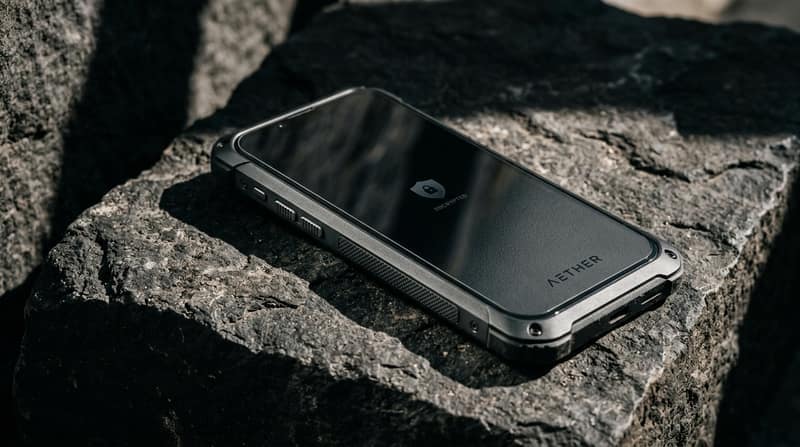
When you unbox the Volla Plinius, the first thing you notice is that it doesn't look like a $1,000 flagship, and that's precisely because it isn't. Coming in at roughly $549 (or €499 depending on where you import it from), the Plinius is built like a tank, prioritizing sustainability and repairability over sleek, fragile glass-sandwich aesthetics.
You get a solid, aerospace-grade aluminum frame, a textured polycarbonate back that actually provides grip (a rarity these days), and—yes, you read that correctly, in 2026—a removable battery! Popping the back off to swap a cell or access the dual SIM and dedicated MicroSD slots felt like stepping into a time machine, in the best way possible.
The display is a 6.67-inch AMOLED panel that is surprisingly vibrant and crisp. The refresh rate caps at 90Hz, which might feel like a slight downgrade if you're coming from a 120Hz Pro model. However, in my experience, the UI animations are so stripped back and purposeful that you hardly notice the missing frames.
Under the hood, it’s powered by a mid-range MediaTek Dimensity processor paired with 8GB of RAM and 128GB of expandable storage. It's not going to break any benchmark records, and it won't render 4K video exports in record time. But that's entirely missing the point. You aren't buying this phone to play the latest graphically intensive gacha games. You're buying it because you want a device that doesn't constantly phone home to a server in Silicon Valley.
- ✓ True de-Googled experience
- ✓ Removable battery & MicroSD
- ✓ Volla OS is incredibly intuitive
- ✓ Excellent battery life without background tracking.
- ✗ Camera processing is just average
- ✗ Banking app compatibility requires patience
- ✗ No wireless charging.
The Setup Process: Entering a New Paradigm
Booting up the Volla Plinius for the first time is a stark contrast to setting up a traditional smartphone. There are no prompts asking you to sign into an overarching cloud account. There is no unskippable agreement to share anonymous usage data. You turn it on, set a PIN, and you are dropped immediately into the OS.
The real magic of the Plinius lies in its software. When you order the device, you usually have a choice: Volla OS (which is based on the Android Open Source Project, or AOSP, but entirely free of Google Services) or Ubuntu Touch for the true Linux enthusiasts. I opted for Volla OS because, realistically, I needed some semblance of Android app compatibility for my daily workflow.
Volla OS introduces a unique concept called the "Springboard." Instead of a traditional grid of apps and widgets, your home screen is fundamentally a smart text field. You start typing what you want to do—"Call Mom," "Take a note," "Search DuckDuckGo"—and the OS intuitively surfaces the right action or contact.
I won't lie: it felt jarring for the first 48 hours. We are deeply conditioned to hunt for colorful icons to trigger our digital habits. But by day three, my muscle memory adapted. I found myself navigating the phone much faster, bypassing the visual clutter entirely. It’s an incredibly intentional way to use a phone. If you are curious about other minimalist setups or taking a break from constant notifications, you might find our comprehensive guide to digital minimalism and productivity quite useful. The Volla philosophy fits perfectly into that lifestyle.
The App Gap: A Realistic Look at De-Googling
Here is where the rubber meets the road, and where most tech reviewers usually abandon the experiment. Using a de-Googled phone is not for the faint of heart. Since there is no Google Play Store pre-installed, you rely heavily on the Aurora Store (an anonymous, privacy-respecting frontend for fetching apps from the Play Store repository) and F-Droid (the legendary repository for free and open-source software).
Getting my basic suite of apps working was a mixed bag of triumphs and compromises:
- Messaging: Signal and Telegram work flawlessly out of the box, as they have their own background delivery networks that don't rely on Google. Standard SMS/MMS is handled perfectly by the native app.
- Navigation: Magic Earth comes pre-installed, and surprisingly, its offline mapping and privacy-first routing are stellar. I actually prefer its turn-by-turn UI to Google Maps now, though traffic updates can occasionally lag behind Google's crowdsourced behemoth.
- Banking: This is the universal pain point for custom ROMs and de-Googled phones. Because the Plinius lacks Google's SafetyNet (or the newer Play Integrity API), several banking apps flat-out refuse to run, flagging the device as "insecure" simply because Google isn't verifying it. I had to resort to logging into my primary bank via the web browser. It's a significant friction point that you must consider.
- Ridesharing and Food Delivery: Uber works adequately via their web app, but native app push notifications are often delayed or non-existent because they stubbornly rely on Google Cloud Messaging (GCM).
The MicroG Dilemma: Finding the Middle Ground
To bridge this app compatibility gap, Volla OS allows you to easily install MicroG. For the uninitiated, MicroG is an open-source reimplementation of Google's proprietary core libraries. It basically tricks apps into thinking Google Play Services are installed, allowing things like push notifications and basic location services to function without actually sending a massive payload of your personal data back to Mountain View.
Using MicroG makes the Plinius vastly more usable for the average person. Suddenly, Slack notifications arrive on time, and apps that rely on mapping APIs stop crashing. However, purists will argue that installing MicroG is a compromise. You have to decide where you draw the line in the sand. For me, the implementation of MicroG on the Plinius strikes the perfect balance: it restores functionality while stripping out the invasive telemetry.
Security Architecture: Beyond Just Open Source
Privacy and security are often conflated, but they are two distinct beasts. The Volla Plinius tackles both. On the privacy front, it stops the outward flow of data. On the security front, it hardens the device against intrusion.
The device features a deeply integrated VPN service, allowing you to route all traffic securely straight out of the box without downloading third-party clients. Furthermore, it includes a physical hardware kill-switch. With a simple slide of a toggle on the side of the chassis, you physically disconnect the microphone and camera from the motherboard. In an era where apps constantly request background microphone access, knowing that a hardware barrier exists provides an immense sense of relief. It's a feature that should honestly be mandatory on every device on the market.
For those looking to extend this kind of security to their home networks and personal computers, I highly recommend checking out our ultimate guide to securing your digital footprint. Pairing a device like the Plinius with secure home networking practices is the ultimate way to achieve digital sovereignty.
Camera Performance: The Utilitarian Approach
If there is one area where the Volla Plinius truly shows its mid-range roots and lack of Silicon Valley R&D budget, it's the camera system. It features a 50MP main sensor and an 8MP ultrawide lens. In broad daylight, with a steady hand, the photos are... completely fine. They have decent dynamic range and accurate colors.
However, they severely lack the heavy computational photography magic that we've come to expect from modern smartphones. There is no AI aggressively brightening the shadows, sharpening faces, or artificially blurring the background. Low-light photography is muddy, and the shutter lag can be frustrating if you're trying to capture a moving subject, like an energetic pet or a toddler.
If smartphone photography is your primary hobby or profession, the Plinius will disappoint you. It forces you to treat the camera as a utilitarian tool—perfect for scanning a document, capturing a whiteboard, or taking a quick memory shot—rather than a creative powerhouse. If you're looking for devices that balance some level of privacy with top-tier hardware and camera specs, take a look at our latest tech trends and flagship reviews where we discuss how mainstream OEMs are slowly incorporating more on-device AI processing to protect user data without sacrificing photo quality.
Battery Life: The Unsung Hero of Privacy
Here is a fascinating side effect of taking back your privacy: your battery life skyrockets. Without a dozen background services constantly polling your GPS location, analyzing your search history, syncing advertising IDs, and uploading telemetry data, the Plinius sips power.
The 5,000 mAh cell easily pushed me through two full days of moderate to heavy use. I found myself rarely reaching for the charger before the end of day two, ending most 24-hour periods with 60% still in the tank. When it does come time to charge, it supports standard 30W wired charging. There is no wireless charging, which I slightly missed at my desk, but given the removable back panel and the sheer longevity of the battery, it's a structural tradeoff I gladly accepted.
The Psychological Shift
Perhaps the most interesting part of my three weeks with the Volla Plinius wasn't a clever software feature or a hardware spec; it was the psychological shift in how I interacted with the internet.
When your phone isn't constantly nudging you with hyper-personalized content tailored to keep your eyeballs glued to the screen, the dopamine loop breaks. I stopped mindlessly doomscrolling while waiting in line because the frictionless avenues to do so were either gone or slightly more tedious to access. The Plinius reverted to being a tool—a piece of utility I used with intent—rather than a slot machine I pulled for entertainment.
It’s a feeling that is hard to quantify, but there is a profound sense of peace that comes with knowing the glowing rectangle in your pocket works strictly for you, and not as an extraction point for a multi-billion dollar advertising empire.
Final Verdict: Who is the Volla Plinius For?
The Volla Plinius is not an iPhone killer, nor is it trying to be the next Samsung Galaxy. It is a highly specialized piece of hardware designed for a specific demographic: people who are tired of being the product.
If you rely heavily on the Google ecosystem for work, if you need the absolute best computational smartphone camera, or if you can't live without the convenience of seamless smart home integrations and instant push notifications across a hundred different niche apps, do not buy this phone. It will only frustrate you.
But, if you are willing to embrace a bit of friction, if you value open-source software, and if you desperately want a device that respects your digital autonomy above all else, the Volla Plinius is one of the most compelling options on the market right now.
It proved to me that you can indeed live a functional, connected, and productive life without surrendering your data. It just takes a little bit of effort, a willingness to adapt, and a desire to break away from the norm. In my book, that effort is entirely worth it.
The Volla Plinius isn't just a smartphone; it's a statement. And in a world of endless surveillance capitalism, sometimes making a statement is exactly what you need to do to take your life back.
Swayam tests AI tools, gadgets, and developer platforms hands-on before writing about them. His work focuses on making complex tech approachable — without the hype. He has covered over 75 products across AI, gadgets, and software for TechPixelly.