Insta360 Mic Pro Review: The World's First E-Ink Wireless Microphone
Quick Summary
The Insta360 Mic Pro is a genuinely exciting piece of kit — the world's first wireless microphone system featuring a customizable E-ink display on the transmitter. Audio quality is crisp, the build feels premium, and the E-ink screen is a clever differentiator for on-camera creators. At $199.99, it's on the pricier end for wireless lav systems, but the combination of excellent sound, standout branding potential, and long battery life makes it hard to dismiss. Recommended for YouTube creators, vloggers, and anyone who cares about looking polished on camera.
Introduction: When Audio Meets Personal Brand
Let's be honest — most wireless microphone systems are invisible. They clip onto your shirt, you forget they're there, and your audience never thinks twice about them. They're utility tools: necessary, reliable, and thoroughly unglamorous.
Insta360 looked at that and decided to flip the script entirely.
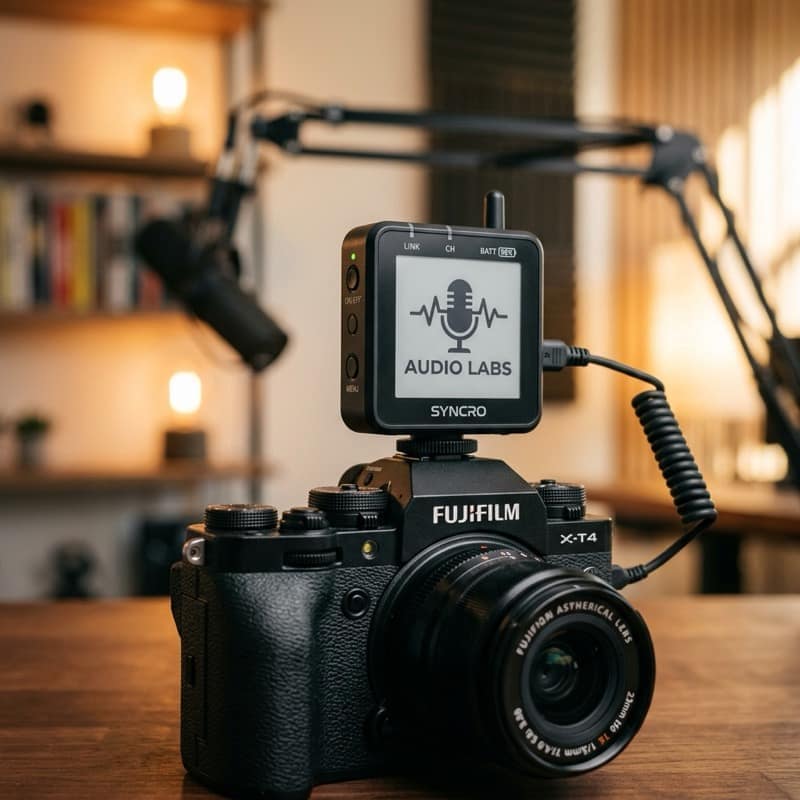
The Insta360 Mic Pro isn't just a wireless lavalier system with solid audio specs. It's the world's first wireless microphone to feature a built-in E-ink display on the transmitter — a customizable digital face you can brand with your logo, show channel names, display battery levels, and more. It's a product that dares to say: your microphone can be part of your on-camera identity.
But does the gimmick hold up? Is the audio actually good? And is it worth nearly $200 when competitors like the DJI Mic 2 and Rode Wireless GO II are already well-established? I spent three weeks with the Insta360 Mic Pro on shoots ranging from indoor sit-downs to outdoor street interviews, and here's everything you need to know.
What's in the Box?
Opening the Insta360 Mic Pro is a satisfying unboxing experience — it arrives in a compact, magnetically sealed charging case that doubles as transport protection. Inside, you'll find:
- 1x Receiver (plugs into your camera or phone via USB-C or Lightning)
- 1x Transmitter with E-ink display (clip-on style)
- 1x Lavalier microphone with a windshield
- USB-C charging cable
- 3.5mm TRS to TRRS adapter
- Quick-start guide and companion app instructions
Everything is neatly nested in a foam-lined case that's easy to toss in a camera bag. The charging case itself holds about two full charges for the transmitter and receiver combined, which gives you roughly 15 hours of total recording time — solid for a full day of shooting.
Design & Build Quality
The E-Ink Display — The Real Star of the Show
Let's start with the headline feature. The E-ink display on the transmitter is, without exaggeration, one of the most distinctive design choices I've seen in creator gear in years.
E-ink technology — the same screen technology used in Kindle e-readers — is used here as a customizable face for the mic transmitter. Via the companion app (iOS and Android), you can:
- Upload your YouTube or social media channel logo
- Display a custom text label (e.g., "TechPixelly" or "LIVE")
- Show mic status indicators, battery level, and gain settings
- Switch between multiple preset branding layouts
The display refreshes in under a second when you change layouts via the app, and because it's E-ink, it draws virtually no power to maintain a static image. You could have your logo displayed all day without any meaningful battery drain from the screen itself.
For on-camera interviews or talking-head videos where the mic is visible on the lapel, this is a genuinely useful branding tool. I've seen creators tape paper labels onto their mics for this exact reason — the Insta360 Mic Pro makes that look embarrassingly low-tech by comparison.
Transmitter Body & Clip
Beyond the display, the transmitter is compact — slightly larger than the DJI Mic 2 transmitter, but not unreasonably so. The clip mechanism is secure and rotates 360 degrees, which makes it easy to position without twisting the body of the mic awkwardly. The matte finish resists fingerprints, and the whole unit feels solid without being heavy.
The receiver is similarly slim and designed to sit unobtrusively on top of your camera's hot shoe or clip to your phone. Both units are rated IPX4 water-resistant — not enough for rain photography, but plenty for sweaty interviews, light drizzle, and outdoor summer shoots.
Audio Quality: Does It Actually Sound Good?
Here's where a lot of flashy gadgets fall apart — the core performance. The Insta360 Mic Pro, I'm glad to report, doesn't sacrifice audio for style.
Recording Modes
The Mic Pro supports three main recording modes:
- Standard (24-bit/48kHz): Clean, broadcast-quality audio suitable for YouTube, podcasts, and social content
- Safety Track Mode: Records a second channel at -6dB to protect against unexpected loud sounds
- Multi-Mic Monitoring: Real-time audio monitoring with no perceptible latency via the receiver's 3.5mm output
Sound Characteristics
In quiet indoor environments, the Insta360 Mic Pro captures voice with excellent clarity and warmth. There's a natural midrange presence that makes dialogue feel full without sounding overly processed. In noisier outdoor environments, the built-in noise-reduction algorithm works well — not magic, but genuinely competent. Wind noise suppression with the included furry windshield is good, though in strong gusts you'll still get some interference.
Compared directly to the Rode Wireless GO II, the Insta360 Mic Pro holds its own in clarity and frequency response. The DJI Mic 2 still has a slight edge in noise rejection outdoors, but the gap is narrower than I expected given the Insta360's differentiating features.
One area that impressed me: Bluetooth transmission stability. Over three weeks of testing, I had zero dropouts indoors and only occasional micro-interruptions outdoors beyond 25 meters — and that's with walls, trees, and city interference in play. The stated 100-meter range is optimistic, but 30–40 meters in real-world conditions is realistic and more than adequate for most shoots.
Companion App: Useful, But Needs Polish
The Insta360 app companion for the Mic Pro is functional — you can manage E-ink display layouts, adjust gain settings, monitor battery levels, and configure safety track preferences all from your phone. The E-ink customization interface is particularly intuitive: drag in an image, resize, position, and send it to the mic in about 30 seconds.
That said, the app still feels like a version 1.0 product. The UI isn't as polished as DJI's Mimo app, some menus require more taps than they should, and there's currently no desktop version for those who prefer managing gear from a computer. These are solvable issues — firmware updates have already improved stability since launch — but it's worth noting if you value a seamless app experience.
Battery Life
Insta360 claims approximately 7 hours of continuous recording from the transmitter and receiver independently, with the charging case providing an additional full charge for each unit. In my testing, I consistently got 6.5 to 7 hours from the transmitter on a single charge, which aligns with official claims.
Charging is quick: the transmitter goes from empty to full in about 90 minutes via USB-C, and the case itself charges via USB-C as well. If you're shooting multi-day events, the case-based charging setup is a thoughtful convenience.
Who Should Buy the Insta360 Mic Pro?
The Insta360 Mic Pro is unambiguously aimed at content creators who care about presentation. If you shoot talking-head videos, vlog-style content, or interview formats where the mic transmitter is visible on camera, the E-ink branding display is a genuinely valuable feature that sets you apart.
It's a great fit for:
- YouTubers and social media creators who want polished, branded on-camera setups
- Podcasters who record video alongside audio
- Interview-format creators who mic multiple subjects and want a professional look
- Insta360 camera users who want ecosystem continuity
It's less ideal for:
- Run-and-gun documentary or news shooters who need maximum ruggedness and weather sealing
- Pure audio professionals who prioritize specs above all else and don't care about aesthetics
- Budget-conscious buyers — there are capable wireless mics at $80–$120 that skip the E-ink flair
How It Compares to the Competition
| Feature | Insta360 Mic Pro | DJI Mic 2 | Rode Wireless GO II |
|---|---|---|---|
| Price | $199.99 | $299.00 | $299.00 |
| E-ink Display | ✅ Yes | ❌ No | ❌ No |
| Battery Life | 7 hours | 6 hours | 7 hours |
| Water Resistance | IPX4 | IPX4 | No |
| Safety Track | ✅ Yes | ✅ Yes | ✅ Yes |
| On-Device Recording | ❌ No | ✅ Yes | ✅ Yes |
| Noise Cancellation | Good | Excellent | Good |
The missing feature here is on-device recording — both the DJI Mic 2 and Rode Wireless GO II can record directly to internal memory as a backup. The Insta360 Mic Pro does not. For most creators, this won't matter, but for anyone who shoots in challenging RF environments, that backup recording can be a lifesaver.
- ✓ Industry-first E-ink display
- ✓ great audio quality
- ✓ compact
- ✗ Premium price
- ✗ niche use
Final Verdict
The Insta360 Mic Pro is one of the most genuinely original microphone products to hit the market in years. It solves a real (if niche) problem — making your audio gear part of your visual identity — with smart engineering and a feature that actually works as advertised. The E-ink display isn't a throwaway gimmick; it's a thoughtful, power-efficient implementation that creators will find genuinely useful.
Backing that up is solid audio quality, a stable Bluetooth connection, good battery life, and a build that feels worthy of the price tag. The companion app and the absence of on-device backup recording are the main areas where the product falls short of its rivals, but neither is a dealbreaker for most users.
At $199.99, the Insta360 Mic Pro sits at a sweet spot that's more affordable than the DJI Mic 2 and Rode Wireless GO II while offering something neither competitor can match. If you're a creator who shoots on-camera content and wants to level up both your audio and your brand presentation, this is an easy recommendation.
Rating: 4.5 / 5 ⭐⭐⭐⭐½
Frequently Asked Questions
Does the Insta360 Mic Pro work with smartphones?
Yes — the receiver supports USB-C and Lightning connections, making it compatible with modern iPhones, Android devices, and most mirrorless cameras.
Can I customize the E-ink display without the app?
No, you'll need the companion app to upload custom logos or adjust display layouts. Pre-set layouts (battery indicator, channel name) are accessible via the physical buttons.
Is there a two-transmitter kit available?
At the time of writing, Insta360 offers the Mic Pro as a single-transmitter system. A dual-transmitter bundle has been hinted at but not yet officially confirmed.
Does the E-ink display drain the battery?
Because E-ink only consumes power when refreshing (changing the image), maintaining a static logo or display costs virtually nothing. The display is not a meaningful drain on the transmitter battery.
How does it handle background noise?
The built-in noise reduction handles moderate background noise (cafe ambiance, light street noise) well. In very noisy environments, a dedicated external noise-canceling lav mic will still outperform, but for typical creator use cases, the Mic Pro performs admirably.
Swayam tests AI tools, gadgets, and developer platforms hands-on before writing about them. His work focuses on making complex tech approachable — without the hype. He has covered over 75 products across AI, gadgets, and software for TechPixelly.