How to Prepare Your PC Build for GTA 6 System Requirements
TL;DR
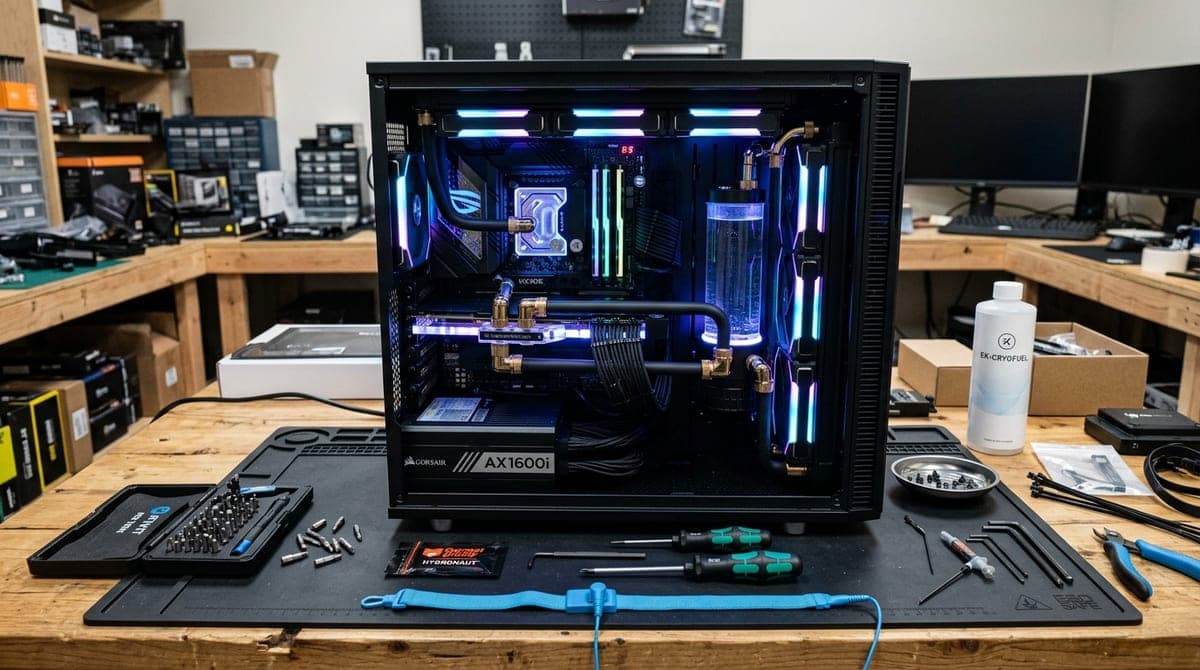
GTA 6 is poised to be the most demanding and visually spectacular game of this generation. To run it smoothly, especially at 1440p or 4K resolutions, you'll need a modern multi-core processor (Intel Core i5/i7 13th Gen+ or Ryzen 5/7 7000+), at least 32GB of DDR5 RAM, a high-end graphics card (RTX 4070 or better), and a blazing-fast PCIe Gen 4 or Gen 5 NVMe SSD. Proper cooling and a robust power supply are also mandatory. Don't let an aging rig hold you back from exploring the vibrant, chaotic world of Leonida in all its glory.
The Wait is Almost Over: Is Your Rig Ready?
It’s the title the entire gaming industry has been eagerly anticipating for over a decade. After years of relentless speculation, massive leaks, and trailers that broke the internet, Grand Theft Auto VI is finally cresting the horizon. Rockstar Games has a storied history of pushing hardware boundaries to their absolute breaking point, and the hyper-realistic, sprawling, and densely populated state of Leonida will undoubtedly be their most ambitious technical achievement yet.
If you are a dedicated PC gamer, the question isn't just when you will get to play it, but how well your system will actually run it. Will you be cruising down Vice City's neon-drenched streets in a hypercar at a buttery-smooth 60 to 120 FPS, or will you be stuttering through intense swamp shootouts and police chases? Now is the perfect time to audit your current system, identify your bottlenecks, and start planning your PC build upgrades.
In this exhaustive and comprehensive guide, we will break down the expected GTA 6 system requirements, analyze what the latest iteration of the Rockstar Advanced Game Engine (RAGE) demands, and help you future-proof your gaming rig. By the time launch day arrives, you will be able to experience Rockstar’s magnum opus exactly the way the developers intended.
Predicting the Unpredictable: The Evolution of the RAGE Engine
Before we dive into specific parts, we have to understand the beast we are dealing with. Rockstar’s proprietary RAGE engine has powered their games since GTA IV. With Red Dead Redemption 2, RAGE proved it could handle incredibly dense foliage, volumetric lighting, realistic weather, and complex AI ecosystems.
For GTA 6, leaks and official footage indicate that RAGE has received a massive overhaul. We are looking at advanced water physics (crucial for a Florida-inspired map), hyper-realistic hair and fabric physics, ray-traced global illumination, and an unprecedented density of NPCs and traffic. This level of simulation requires significant computational horsepower. Your CPU will be calculating the routines of hundreds of unique NPCs on screen, while your GPU handles the intense lighting and reflection calculations.
Expected Minimum Requirements (1080p, 30-60 FPS, Low/Medium Settings)
To simply get your foot in the door and run the game without it crashing, you will still need a surprisingly capable machine. Rockstar generally optimizes well, but the sheer scale of the game sets a high floor.
- CPU: Intel Core i5-10600K or AMD Ryzen 5 3600
- GPU: NVIDIA GeForce RTX 3060 (12GB) or AMD Radeon RX 6600 XT
- RAM: 16GB DDR4 (3200MHz)
- Storage: 150GB+ NVMe SSD (SATA SSDs might struggle with texture streaming)
Expected Recommended Requirements (1440p, 60+ FPS, High Settings)
To experience the vibrant sunsets, dense crowds, and realistic physics with some ray tracing features enabled, this is where most PC gamers should aim.
- CPU: Intel Core i7-13700K or AMD Ryzen 7 7800X3D
- GPU: NVIDIA GeForce RTX 4070 Ti SUPER or AMD Radeon RX 7900 XT
- RAM: 32GB DDR5 (6000MHz+)
- Storage: 150GB+ PCIe Gen 4 NVMe SSD
The "Welcome to Vice City" Enthusiast Build (4K, 60-120 FPS, Ultra/Psycho Settings)
For those who want zero compromises, maximum ray tracing, and stunning 4K clarity.
- CPU: Intel Core i9-14900K or AMD Ryzen 9 7950X3D
- GPU: NVIDIA GeForce RTX 4090 (or the upcoming RTX 5080/5090)
- RAM: 64GB DDR5 (6400MHz+)
- Storage: 2TB+ PCIe Gen 5 NVMe SSD
Upgrading the Core Components: Where to Spend Your Money
The Brains: Choosing the Right CPU for Open-World Chaos
Open-world games are notoriously CPU-bound. They require complex, real-time calculations for NPC artificial intelligence, traffic density routing, physics interactions, and background world streaming. If your processor is lagging behind, you will experience severe frame drops and stuttering (often referred to as the 1% lows dropping out), regardless of how powerful your graphics card is.
What to buy: If you are building a new PC right now, the AMD Ryzen 7 7800X3D is arguably the reigning champion for gaming. Its massive 3D V-Cache architecture allows it to store vast amounts of game data right on the CPU die, which massively benefits open-world titles by reducing latency. Alternatively, the Intel Core i7-14700K offers incredible multi-threaded performance that will breeze through heavy background processes.
Tip: If you're swapping motherboards for a new CPU, be sure to read our comprehensive guide on choosing the right motherboard form factor to ensure compatibility with your existing case and cooling setup.
The Muscle: GPU VRAM and Ray Tracing Dominance
GTA 6 is expected to heavily utilize ray tracing for global illumination (how light bounces off environments), reflections on car chassis and glass buildings, and realistic water rendering in the swamps of Leonida. Because of this heavy reliance on advanced lighting, NVIDIA GPUs currently hold a distinct advantage due to their dedicated RT cores and superior DLSS (Deep Learning Super Sampling) upscaling tech.
- ✓ Incredible 1440p performance
- ✓ 16GB VRAM future-proofing
- ✓ Excellent DLSS 3 Frame Generation support
- ✗ Premium price tag
- ✗ large physical footprint requires a spacious case
The RTX 4070 Ti SUPER is the absolute sweet spot for modern high-end gaming. It boasts 16GB of VRAM—a crucial metric since modern AAA games easily consume 12GB+ just for high-resolution textures. If a graphics card runs out of VRAM, the game is forced to swap data into system RAM, causing massive, unplayable lag spikes. If you're on a tighter budget, look into the RTX 4060 Ti, but be very mindful of its 8GB VRAM limitations. AMD's Radeon RX 7800 XT is also a fantastic, cost-effective alternative for pure rasterization performance, though it falls slightly behind in heavy ray-tracing scenarios.
Memory Matters: The Inevitable Shift to 32GB
We are officially exiting the era where 16GB of system RAM was considered "plenty." With background apps like Discord, Chrome (notorious for eating RAM), Spotify, and recording software like OBS constantly running, a behemoth like GTA 6 will easily eat up all remaining available memory.
Upgrading to 32GB of RAM is one of the most cost-effective ways to ensure a smooth, hitch-free experience. If your motherboard supports it, making the jump to DDR5 memory (running at 6000MHz or higher with low latency, like CL30) will provide vastly superior minimum framerates and snappier world loading compared to older DDR4 kits. If you are still on DDR4, upgrading to 32GB of 3600MHz memory is still highly recommended to prevent bottlenecks.
Storage: The Complete End of the HDD Era
Do not, under any circumstances, attempt to install GTA 6 on a mechanical Hard Disk Drive (HDD). Game engines like RAGE rely heavily on a technique called "texture streaming." This means the engine constantly loads high-resolution textures, audio files, and 3D geometry data from your storage drive directly into memory as you drive through the state at high speeds.
An HDD simply cannot physically spin fast enough to keep up with these demands, resulting in massive texture pop-in (where buildings or roads look like blurry mud until you stop moving), audio desync, and game-breaking stutters.
You need a fast NVMe SSD. Specifically, look for a PCIe Gen 4 or Gen 5 drive with sequential read speeds exceeding 5,000 MB/s.
- ✓ Blistering fast 7
- ✓ 300 MB/s read speeds
- ✓ highly reliable brand
- ✓ massive 2TB capacity
- ✗ Heatsink model costs extra
- ✗ Gen 4 (not Gen 5)
Given that Red Dead Redemption 2 hovered around the 120GB mark, and GTA V ballooned over 100GB with updates, expect GTA 6 to easily surpass 150GB to 200GB at launch. A 2TB drive is highly recommended so you have ample room for your operating system, your other games, and the inevitable, massive content updates for the next iteration of GTA Online. If you need help installing an M.2 drive, check out our step-by-step NVMe SSD installation guide.
Don't Forget the Supporting Cast: Power and Thermals
It is incredibly easy to blow your entire PC building budget on a flashy CPU and GPU, but ignoring your power supply and cooling solutions can be a fatal, hardware-destroying mistake.
Power Supply (PSU): The Unsung Hero
High-end components draw a massive amount of power and generate what are known as "transient spikes"—sudden, millisecond-long bursts of power draw that can trip older power supplies and cause your PC to abruptly shut down.
We strongly recommend at least an 850W Gold-rated ATX 3.0 power supply for mid-to-high-end builds, and 1000W for enthusiast builds. ATX 3.0 models include the newer 12VHPWR cables natively. These cables plug directly into RTX 40-series cards without the need for the bulky, sometimes unreliable adapter dongles that come in the GPU box. Quality brands to look out for include Corsair, Seasonic, EVGA, and be quiet!.
Cooling and Case Airflow: Beating the Heat
Running a demanding game like GTA 6 for hours on end will essentially turn your PC into a space heater. If your components get too hot, they will automatically slow themselves down (a process called thermal throttling) to prevent damage, instantly tanking your framerate.
Ensure your case has adequate airflow. You should have at least two intake fans at the front pulling cool air in, and one exhaust fan at the rear pushing hot air out. If you opted for a high-end, heat-producing CPU like the Intel i7-14700K or i9-14900K, a robust 360mm AIO (All-In-One) Liquid Cooler is practically mandatory. For Ryzen chips, a top-tier dual-tower air cooler like the Noctua NH-D15 or Deepcool AK620 will suffice.
For more actionable tips on keeping temperatures down, read our deep dive on optimizing PC case airflow for heavy gaming.
Beyond the Tower: Peripheral Upgrades
A beastly PC is only as good as the peripherals you use to interact with it. To truly appreciate the visual masterpiece that GTA 6 promises to be, you might need to upgrade your desk setup as well.
The Display: Upgrading Your Monitor
If you are buying an RTX 4070 or better, playing on a 1080p 60Hz monitor is a massive waste of potential. You need a display that can showcase the hardware's power. We highly recommend upgrading to a 1440p OLED or IPS monitor with a 144Hz+ refresh rate. OLED panels, in particular, offer infinite contrast ratios, meaning the neon lights of Vice City at night will pop beautifully against pitch-black skies. Check out our roundup of the best gaming monitors for 2026 to find the perfect fit.
Audio: Hear Every Detail
The audio design in Rockstar games is legendary. From the roar of a V8 engine to the distant wail of police sirens and the chatter of NPCs, directional audio is key to immersion. Invest in a high-quality gaming headset or a dedicated DAC/Amp combo with studio headphones to ensure you don't miss a beat of the game's highly anticipated radio stations.
Software Optimization: Free Performance Gains
Hardware is only half the battle. To squeeze every last frame out of your system, your software needs to be dialed in correctly.
- Keep Drivers Updated: Both NVIDIA and AMD will absolutely release "Game Ready" drivers specifically tuned for GTA 6 just days before launch. Ensure you update your graphics drivers immediately to benefit from specific optimizations.
- Debloat Windows: Turn off unnecessary startup programs, disable background apps you aren't using, and ensure Windows Game Mode is enabled. Read our full guide on optimizing Windows 11 for gaming for a deeper, step-by-step tutorial.
- Embrace AI Upscaling: Do not be a purist when it comes to native resolution. Use DLSS (NVIDIA) or FSR (AMD). Setting these technologies to "Quality" mode provides a massive 20-40% boost to framerates with almost imperceptible losses in visual quality.
- BIOS Updates and XMP: Make sure your motherboard BIOS is up to date for maximum stability. More importantly, verify that XMP (Extreme Memory Profile) or EXPO is enabled in your BIOS so your RAM runs at its advertised high speed, rather than the sluggish default base speed.
Final Thoughts: The Road to Leonida
Upgrading a PC is a significant investment of time and money. However, preparing for a monolithic, industry-defining release like GTA 6 is the perfect excuse to finally pull the trigger on those new parts you've been eyeing in your shopping cart for months.
By focusing your budget on a strong multi-core CPU, at least 32GB of high-speed RAM, a competent modern GPU with plenty of VRAM, and rapid NVMe storage, you'll be well-equipped to tackle whatever Rockstar throws our way.
Don't wait until the week before launch when the hype is at its peak and parts inevitably go out of stock—start planning, budgeting, and building your dream rig today. When that intro music kicks in and the camera pans over the Vice City skyline, you'll be glad you did.
Are you planning to upgrade your entire rig from scratch, or are you just swapping out a few key parts? Do you think your current setup can handle it? Let us know your GTA 6 build plans and expectations on our social channels!
David tests AI tools, gadgets, and developer platforms hands-on before writing about them. His work focuses on making complex tech approachable — without the hype. He has covered 100+ products across AI, gadgets, and software for TechPixelly.