How to Create Decentralized Systems for Smart Home Automation
Quick Summary
Building a decentralized smart home automation system protects your privacy and ensures your devices work even without internet access. By replacing cloud-dependent hubs with a local controller like Home Assistant or Hubitat, utilizing local protocols like Zigbee, Z-Wave, or Thread, and self-hosting your data, you can regain complete control over your home environment. This guide covers the essential components, step-by-step setup, and best practices for creating a robust, private, and lightning-fast smart home.
The Problem with Cloud-Based Smart Homes
For most consumers, the smart home journey begins with cloud-dependent devices—a Wi-Fi light bulb here, a smart speaker there, all tied to massive corporate servers. While convenient, this architecture presents several critical flaws:
- Internet Dependency: When your internet goes down, or the company's servers experience an outage, your smart home becomes dumb. You shouldn't need a connection to a server 1,000 miles away just to turn on the lights in your living room.
- Privacy Concerns: Cloud-connected devices are constantly phoning home, sending data about your habits, routines, and presence to third-party servers. Your home should be your most private sanctuary, not a data-mining operation.
- Planned Obsolescence (and "Brick" Risk): If a smart home company goes bankrupt or decides to shut down its servers, your expensive hardware transforms into useless e-waste overnight (a phenomenon we've seen repeatedly).
- Latency: Sending a command to the cloud and waiting for a response to come back down to your local device adds noticeable, frustrating latency to simple actions.
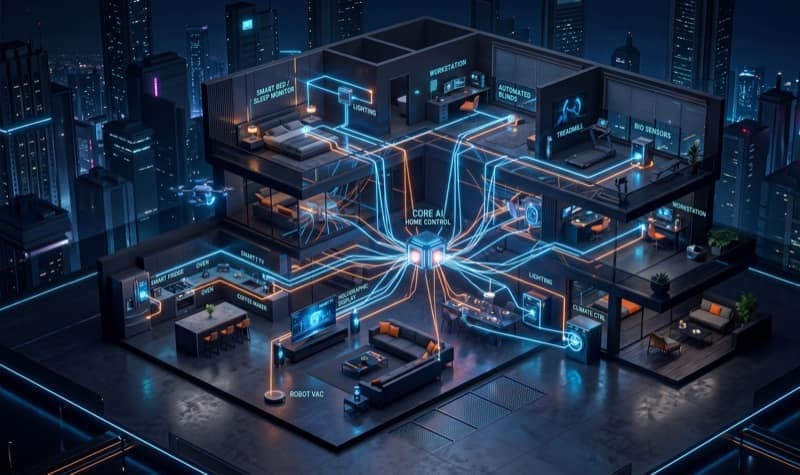
The solution? Decentralization. A decentralized, local-first smart home processes automation rules within your home, on your own hardware, without relying on external servers.
Essential Components of a Decentralized Smart Home
To build a truly decentralized system, you need to rethink your smart home's architecture. Instead of devices connecting directly to the internet, they should connect to a central, local "brain."
1. The Local Hub (Your Smart Home's Brain)
The core of your decentralized setup is the automation hub. This device runs software that communicates with all your smart devices, executes automation rules locally, and provides a unified interface.
- Home Assistant (Highly Recommended): The gold standard for local smart homes. It's open-source, highly customizable, and supports thousands of devices locally. You can run it on a Raspberry Pi, an old PC, or a dedicated mini-PC.
- Hubitat Elevation: A great alternative if you want a local-first approach but prefer a more polished, out-of-the-box hardware solution compared to setting up Home Assistant from scratch.
- Homebridge / Scrypted: Useful for exposing non-HomeKit devices to Apple's local HomeKit ecosystem, bridging gaps in compatibility.
- ✓ Perfect balance of power and efficiency; Massive community support; Low power consumption.
- ✗ Can be hard to find in stock; Requires SD card or SSD for storage.
2. Local Communication Protocols
Avoid Wi-Fi devices whenever possible, especially those that require a proprietary app and cloud account. Instead, look for devices that use local mesh networking protocols:
- Zigbee: A low-power mesh network protocol. Devices route signals through each other, creating a robust network. Zigbee devices are generally inexpensive and widely available (e.g., IKEA TRÅDFRI, Philips Hue, Aqara).
- Z-Wave: Similar to Zigbee but operates on a lower radio frequency (around 900MHz), which means less interference with Wi-Fi and better wall penetration. It has strict certification requirements, leading to high reliability and compatibility, though devices tend to be slightly more expensive.
- Thread / Matter: The emerging standard. Thread is a local IPv6-based mesh protocol, and Matter is the overarching application layer. While still maturing, prioritizing Matter-over-Thread devices ensures future-proof, local control.
To use Zigbee or Z-Wave with a hub like Home Assistant, you'll need a USB coordinator dongle (like the Sonoff Zigbee 3.0 USB Dongle Plus or a Zooz Z-Wave stick) to act as the antenna.
3. Local-Only Hardware
When purchasing new smart home gear, always check if it can be controlled locally without an internet connection. Look for the "Works locally" label or search community forums for integration methods.
- Smart Plugs & Switches: Look for Zigbee/Z-Wave options or Wi-Fi devices that can be flashed with open-source local firmware like Tasmota or ESPHome (e.g., Shelly relays).
- Lighting: Zigbee bulbs or local-API controllers like WLED for LED strips.
- Sensors: Motion, temperature, and door/window sensors are almost always best deployed on Zigbee or Z-Wave for optimal battery life and instant local response.
Step-by-Step Guide: Setting Up a Decentralized System with Home Assistant
Ready to take the plunge? Here is a high-level roadmap to setting up a decentralized smart home using Home Assistant.
Step 1: Choose Your Hardware and Install Home Assistant OS
The easiest way to get started is by installing Home Assistant Operating System (HAOS) on a dedicated device.
- Acquire a Raspberry Pi 4 (or Pi 5), an Intel NUC, or a dedicated Home Assistant Green/Yellow device.
- Use balenaEtcher or Raspberry Pi Imager to flash the HAOS image onto an SD card or, preferably, a reliable SSD.
- Connect the device to your router via Ethernet for maximum stability, and power it on.
- Navigate to
http://homeassistant.local:8123in your browser to complete the initial onboarding.
Step 2: Set Up Local Radios (Zigbee/Z-Wave)
To communicate with local devices, you need a coordinator.
- Plug your Zigbee or Z-Wave USB dongle into the Home Assistant device. (Use a USB extension cable to reduce interference from the device's CPU/USB 3.0 ports).
- In Home Assistant, navigate to Settings > Devices & Services.
- For Zigbee, install the ZHA (Zigbee Home Automation) integration or set up Zigbee2MQTT (an advanced but highly recommended alternative).
- For Z-Wave, install the Z-Wave JS UI add-on and integration.
Step 3: Pair Local Devices
Now, you can start adding devices directly to your local network.
- Put your Zigbee or Z-Wave device into pairing mode (usually by holding a button or cycling power).
- In Home Assistant, click "Add Device" within your ZHA or Z-Wave JS integration.
- Home Assistant will discover the device and add its entities (controls and sensors) to your dashboard—no cloud account required!
Step 4: Flash Cloud Devices to Local Firmware (Advanced)
If you already have Wi-Fi devices (like Tuya smart plugs) that rely on the cloud, you might be able to liberate them. Look into projects like:
- ESPHome: An incredibly powerful system that lets you create custom firmware for ESP8266/ESP32 devices. It integrates seamlessly with Home Assistant's native API.
- Tasmota: An alternative open-source firmware for ESP devices, offering extensive local MQTT control.
Flashing often requires some technical skill (sometimes even soldering), but the result is a bulletproof, 100% local device.
Step 5: Build Local Automations
With your devices connected locally, you can create automations that execute instantly.
In Home Assistant, go to Settings > Automations & Scenes. Create an automation based on:
- Triggers: E.g., A local Zigbee motion sensor detects movement.
- Conditions: E.g., The sun is below the horizon (calculated locally based on your coordinates).
- Actions: E.g., Turn on the local Z-Wave living room lights.
Because everything happens on your local hub, this automation will execute in milliseconds, even if your fiber line is cut.
Best Practices for a Private Smart Home
Maintaining a decentralized system requires a slightly different mindset than the plug-and-play cloud approach. Keep these best practices in mind:
Secure Remote Access
Since you aren't relying on a cloud server to mediate your connection when you're away from home, you need a secure way to access your local hub remotely.
- Nabu Casa (Home Assistant Cloud): The easiest method. For a small monthly fee (which supports Home Assistant development), it provides an encrypted, secure tunnel to your instance without opening router ports.
- WireGuard / Tailscale / Cloudflare Tunnels: If you prefer a DIY, free approach, setting up a VPN or a secure tunnel is the best way to access your network remotely without exposing your hub directly to the internet.
Network Segmentation (VLANs)
If you absolutely must have some cloud-dependent devices (like smart TVs or certain proprietary appliances), isolate them on a separate Virtual Local Area Network (VLAN) or a guest Wi-Fi network.
Configure your firewall rules so these devices can access the internet to function, but they cannot access your main, secure local network where your Home Assistant hub and trusted local devices reside.
Prioritize Local Voice Control
Voice assistants (Alexa, Google Assistant) are the ultimate cloud dependencies. For a truly private setup, explore local voice control options:
- Home Assistant Assist: Home Assistant's built-in voice assistant is improving rapidly. You can use it via text, through the companion app, or by building local smart speakers (using ESP32s and ESPHome) that process wake words and commands entirely on your local server.
Regular Local Backups
Your smart home configuration is now stored on your own hardware. If that hardware fails, you lose everything. Implement automated, off-device backups. Home Assistant makes this easy: you can schedule automatic backups and use add-ons to sync them to a local NAS or a secure, encrypted cloud storage bucket like Google Drive or AWS S3.
Conclusion
Creating a decentralized smart home requires more upfront effort than buying an Echo Dot and a cheap Wi-Fi bulb. There is a learning curve, and you become your own IT support. However, the payoff is immense.
You gain a smart home that respects your privacy, responds instantly, and is completely immune to corporate bankruptcies and internet outages. By taking ownership of your smart home infrastructure, you are building a system that serves you, not the companies selling your data. Start small—perhaps with a single room, a local hub, and a few Zigbee bulbs—and expand your decentralized empire from there.
Swayam tests AI tools, gadgets, and developer platforms hands-on before writing about them. His work focuses on making complex tech approachable — without the hype. He has covered over 75 products across AI, gadgets, and software for TechPixelly.