Building AI-integrated Productivity Suites

Two years ago, my daily workflow was an absolute disaster. As the managing editor here at TechPixelly, I was juggling a team of freelance writers, tracking complex SEO metrics, managing our content calendar, and actually trying to write articles.
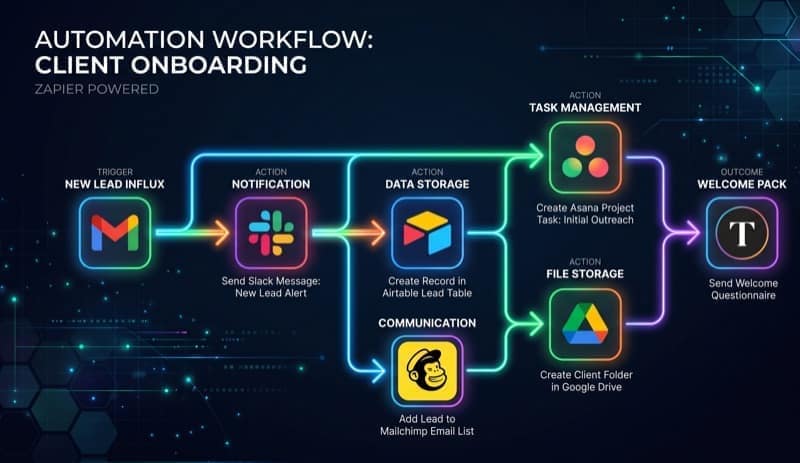
My screen looked like a mosaic of inefficiency. I had a tab for Notion, a tab for Slack, a tab for Trello, a tab for ChatGPT, and a tab for Ahrefs. I spent more time acting as a human router—copy-pasting data between these isolated silos—than doing actual deep work. I tried fixing it with Zapier, creating a labyrinth of "If This Then That" rules that inevitably broke every time an API changed or a teammate moved a card to the wrong column.
Then came the AI boom, and suddenly every app had a magical "sparkles" button. But I quickly realized something fundamental: adding AI to a broken system just gives you a faster broken system.
To truly gain leverage, I needed an integrated AI productivity suite. In this guide, I'm going to walk you through exactly how I stopped duct-taping tools together and started architecting systems that actually understand my work context. If you're still jumping between 10 different apps, our guide to essential AI tools might be a good starting point, but today, we're going deep into architecture, APIs, and real workflow integration.
The "Bolted-On" vs. "Built-In" AI Problem
Most software companies panicked in 2023 and slapped a text box on their existing UI. "Chat with your PDF!" "Chat with your tasks!"
That's bolted-on AI. It requires you to prompt it explicitly for every micro-task. It forces you to provide the context manually. It's exhausting.
Built-in AI, on the other hand, is ambient and contextual. When I open a draft in my current setup, the system already knows the SEO keywords I'm targeting, the demographic of our audience, and my specific tone of voice. It doesn't wait for me to write a 50-word prompt; it proactively offers structural suggestions.
If you are evaluating tools for your team, look for ambient intelligence. If you have to explain who you are to the AI every single time you use it, you're using the wrong tool.
Core Pillars of a True AI Suite
If you want to build or assemble a productivity suite that actually moves the needle, you need four foundational pillars. Skip one, and the whole system collapses into a frustrating gimmick.
1. The Unified Data Layer (The Brain)
Your AI is only as smart as the context it has access to. If your meeting notes are in Evernote, your tasks in Asana, and your client emails in Gmail, your AI is blind. I solved this by migrating my core operations to a unified platform with a robust, well-documented API. The AI needs a single source of truth.
2. Semantic Search (Vectorization)
Keyword search is dead. You need semantic search. When I search for "that article about AdSense growth," I want the system to find the piece I wrote last month, even if I never used the exact phrase "AdSense growth" in the title. Modern suites use vector databases (like Pinecone or Weaviate) to understand the meaning of your documents, not just the text.
3. Autonomous Agents
We are moving past chatbots and into the era of agents. A chatbot answers questions; an agent executes tasks. Your suite needs the ability to take an instruction like "Prepare the weekly SEO report" and autonomously fetch data from Google Search Console, format it in markdown, and drop it into a Slack channel.
4. Seamless UI Integration
The AI shouldn't be a separate tab that you have to alt-tab into. It should be a sidebar, an inline autocomplete, or a context menu directly where you work. Friction is the enemy of productivity.
Assembling the Suite: Best Tools for the Job
I don't recommend coding an entire suite from scratch unless you're a masochist or a well-funded startup. Instead, the smart move is assembling platforms that are AI-native and highly extensible.
Let's talk about the heavy hitters I personally tested and implemented for this setup.
- ✓ Incredible UI
- ✓ seamless writing integration
- ✓ Q&A feature searches entire workspace
- ✓ excellent table autofill.
- ✗ Can get sluggish with massive databases
- ✗ AI responses can be generic without strong custom instructions.
Notion is the closest thing to a unified brain on the market today. Their Q&A feature, which utilizes semantic search across your entire workspace, is the exact capability I mentioned earlier. I use it as the foundational database for all of TechPixelly's operations.
But Notion isn't perfect for complex, multi-stage project orchestration or software development tracking. For that, I tested ClickUp's AI features and Linear's new automated triage integrations. (Check out latest tech trends for a deeper dive into how these specific project management tools are evolving).
Building Custom Integrations (The Secret Sauce)
Here’s where it gets interesting. Buying a subscription to Notion AI is great, but off-the-shelf tools will never perfectly map to your unique workflows. Notion won't automatically read your emails, cross-reference them with your company's internal wiki, and draft responses in your brand voice.
For that, I had to build custom integrations. Here is exactly how I did it:
Step 1: The Context Aggregator
I used Python and the LangChain framework to build a script that runs every night at 2:00 AM. It pulls my latest calendar events via the Google Calendar API, flagged emails from Gmail, and pending mentions in Slack. It pushes all of this context into a local LLM, which summarizes my strict priorities for the next day and creates a customized dashboard in my Notion workspace before I even wake up.
Step 2: The Drafting Assistant
For TechPixelly, writing is the core product. I integrated the OpenAI API (specifically the GPT-4o model) directly into my local Markdown editor using a custom script. When I write a <Draft> tag, the script triggers an API call that looks at my outline, references my past 10 articles for style-matching, and suggests the next three paragraphs.
The cost? A few dollars a month in API credits, compared to the hundreds I was paying for fragmented "AI writing assistants" that didn't actually know my brand voice.
Avoiding the "AI Hallucination" Trap
I have to share a painful lesson here. When I first started automating workflows, I trusted the AI entirely too much with data retrieval and client communication.
Once, I had an automated workflow that drafted weekly performance reports based on database queries. The AI hallucinated a 300% increase in organic traffic for a client. It looked highly convincing, complete with fabricated bullet points explaining why the traffic spiked. It was a terrifying, embarrassing phone call to make to correct the record.
My golden rule: AI should generate drafts; humans should approve them.
Never build a suite where the AI can send external communications or alter production databases without a "human-in-the-loop" approval step. I implemented a simple Slack webhook constraint: the AI proposes an action (e.g., "Ready to send the weekly newsletter to 10k subscribers"), and I physically click a green "Approve" or red "Reject" button in Slack. Trust, but verify.
Cost Analysis: API vs. SaaS Subscriptions
Let's talk money, because building a productivity suite isn't free, and the SaaS subscription fatigue is very real right now.
- The SaaS Route: Notion ($10) + ChatGPT Plus ($20) + Zapier Professional ($20) + Specialized AI Writing Tool ($15) = ~$65/month per user.
- The API Route: Notion Base Plan ($10) + OpenAI API usage (~$5) + Vercel/Render for hosting lightweight scripts ($0) = ~$15/month per user.
The API route is significantly cheaper and infinitely more customizable, but it requires technical chops. If you aren't comfortable writing Python or TypeScript, stick to assembling existing AI-native tools.
You can also use no-code platforms like Make.com (which handles complex, multi-step logic far better than Zapier, in my experience) to stitch these APIs together without writing code.
The Future is Agentic
We are moving rapidly from AI that assists to AI that acts.
In the next 18 months, your productivity suite won't just highlight that tasks are overdue. It will automatically draft an apology email to the client, reschedule the dependent sub-tasks, adjust your Google Calendar blocks to make up for lost time, and notify your team—all autonomously, while you sleep.
If you want to stay ahead of the curve, you have to stop looking at AI as a fancy autocomplete. Start looking at it as a synthetic employee that needs a unified workspace, incredibly clear instructions, and secure access to your operational data to do its job effectively.
Final Thoughts
Building an AI-integrated productivity suite isn't about downloading the newest app on Product Hunt. It's a fundamental architectural shift in how you work.
Start by centralizing your data into a single source of truth. Pick platforms with strong APIs and built-in semantic search. Then, introduce custom automations where off-the-shelf tools inevitably fall short.
What does your stack look like right now? Are you still stuck in the "franken-stack" phase, copy-pasting data between tabs? Dive into our advanced automation tutorials to start upgrading your systems today. The time you invest in building the suite now will pay dividends in hours saved next month.
Swayam tests AI tools, gadgets, and developer platforms hands-on before writing about them. His work focuses on making complex tech approachable — without the hype. He has covered over 75 products across AI, gadgets, and software for TechPixelly.