GravaStar Mercury M2 wireless mouse
Quick Summary
The GravaStar Mercury M2 is a visually striking, high-performance wireless gaming mouse that merges sci-fi aesthetics with competitive-grade hardware. Equipped with the flagship PAW3395 sensor, 26,000 max DPI, and tri-mode connectivity, it offers flawless tracking and responsiveness. While its skeletonized design might not be for everyone, its 79g weight and ergonomic shape make it surprisingly comfortable for long sessions. It's a premium, standout choice for gamers wanting to break away from generic designs.
Unboxing an Alien Artifact: Design and Build Quality
Right out of the box, the GravaStar Mercury M2 demands attention. GravaStar has carved out a unique niche by designing audio and gaming peripherals that look like they were salvaged from a crashed spaceship, and the Mercury M2 is no exception.
The Skeletonized Chassis
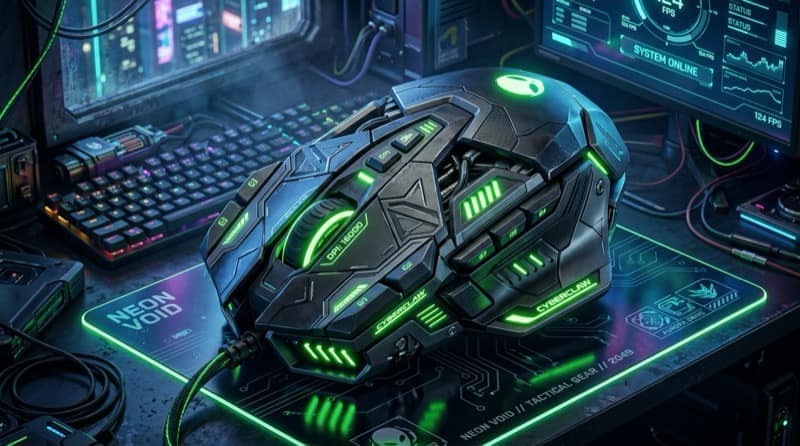
The most prominent feature is its hollowed-out, skeletonized chassis. Unlike the popular "honeycomb" designs that dot the market to reduce weight, the M2 uses a more organic, skeletal frame that exposes its inner workings. This isn't just for show; it serves a dual purpose of reducing weight and maximizing airflow, keeping your hands cool during intense, sweaty gaming sessions.
The mouse is constructed from a durable magnesium alloy (in some premium variants) or high-quality PVC/polycarbonate depending on the exact model finish. The build feels incredibly solid. There is no creaking or flexing when squeezing the sides, which is a common issue with many ultra-lightweight mice.
Ergonomics and Grip Styles
Despite its aggressive looks, the Mercury M2 is surprisingly ergonomic. It features a symmetrical shape, though the side buttons are only on the left, making it best suited for right-handed users.
- Palm Grip: The raised back hump provides ample support for the palm, making it comfortable for palm grippers.
- Claw Grip: The contoured sides and pronounced main buttons make it excellent for claw grips, allowing for quick, precise movements.
- Fingertip Grip: At around 79 grams, it’s light enough to be easily maneuvered with just the fingertips.
While it isn't the absolute lightest mouse on the market (some competitors push below 60g), the 79g weight is a sweet spot that balances the premium metallic feel with competitive nimbleness.
Under the Hood: Performance and Sensor
A gaming mouse can look like a masterpiece, but if the sensor is flawed, it's nothing more than a desk ornament. GravaStar understands this, which is why they’ve packed the Mercury M2 with top-of-the-line hardware.
The PAW3395 Sensor
At the heart of the Mercury M2 is the PixArt PAW3395 sensor. For those unfamiliar with sensor specs, the PAW3395 is currently one of the best optical sensors available in the gaming market. It boasts a maximum DPI of 26,000, a tracking speed of 650 IPS (Inches Per Second), and 50G of acceleration.
What does this mean for your gaming experience?
- Flawless Tracking: Whether you are making micro-adjustments in a tactical shooter like Valorant or doing rapid 180-degree flicks in Apex Legends, the sensor translates your movements onto the screen with 1:1 accuracy. There is zero noticeable angle snapping, jitter, or acceleration.
- Lift-Off Distance (LOD): The LOD is exceptionally low, meaning the mouse stops tracking almost immediately when lifted off the pad. This is crucial for low-sensitivity gamers who need to constantly lift and reposition their mouse.
Switches and Clicks
The main left and right clicks utilize high-quality switches (often TTC Gold or Omron, depending on the batch and specific model year) rated for 50 million clicks. The clicks are crisp, tactile, and have a very short travel distance. There is minimal pre-travel or post-travel, allowing for rapid spam-clicking in MOBA games like League of Legends.
The side buttons are well-placed and easily reachable by the thumb, offering a satisfying click that doesn't feel mushy. The scroll wheel has distinct steps, making it excellent for weapon switching, though it might be a bit stiff for endless scrolling through long webpages.
Tri-Mode Connectivity: Freedom to Choose
In today’s gaming ecosystem, flexibility is key. The GravaStar Mercury M2 offers tri-mode connectivity, ensuring it can connect to virtually any setup you have.
2.4GHz Wireless (Dongle)
For competitive gaming, the 2.4GHz connection is the only way to go. Using the included USB receiver, the Mercury M2 delivers a 1000Hz polling rate (1ms response time). In my testing, the connection was rock-solid, with no noticeable latency or dropouts, even in a room cluttered with other wireless signals. It feels completely indistinguishable from a wired mouse.
Bluetooth 5.1
If you are taking the mouse on the go to use with a laptop, tablet, or even a smartphone, the Bluetooth connection is incredibly convenient. While you wouldn't want to play competitive shooters over Bluetooth due to the inherent latency, it is perfectly fine for casual gaming, productivity, and general browsing. It also helps conserve battery life significantly compared to the 2.4GHz mode.
Wired Mode
The mouse includes a high-quality, flexible paracord-style USB-C to USB-A cable. This allows you to use the mouse wired while it charges. The cable is light and flexible enough that it doesn't drag or catch on the desk, ensuring your gameplay isn't interrupted when you need a top-up.
Battery Life and Charging
Wireless freedom is only as good as the battery that powers it. The GravaStar Mercury M2 packs a 400mAh battery.
On the 2.4GHz connection with the RGB lighting turned on, you can expect roughly 40-50 hours of gameplay. This is decent, but not industry-leading. If you turn the RGB off, that number jumps closer to 80 hours.
In Bluetooth mode with the lights off, the battery life extends massively, easily pushing past the 150-hour mark.
Charging is handled via the front USB-C port. It takes about 1.5 to 2 hours to go from completely dead to 100%. The inclusion of the flexible paracord cable means playing while charging is not a frustrating experience.
Software and Customization: Lighting Up the Void
A sci-fi mouse wouldn't be complete without some futuristic lighting. The Mercury M2 features customizable RGB lighting that shines through the skeletonized chassis, creating a stunning visual effect that GravaStar refers to as the "GLOW" system.
GravaStar Software
To unleash the full potential of the mouse, you'll need to download GravaStar's proprietary software. The software interface is straightforward and allows you to customize several key aspects:
- DPI Stages: Set up to five custom DPI stages that you can cycle through using the dedicated button below the scroll wheel.
- Polling Rate: Adjust the polling rate from 125Hz to 1000Hz depending on your needs.
- Key Mapping: Remap all programmable buttons, including assigning complex macros for MMOs or productivity tasks.
- RGB Customization: Choose from various lighting effects (Breathing, Neon, Wave, etc.) and pick exact colors to match your setup. The RGB is vibrant but can be completely disabled if you prefer a stealthier look.
While the software isn't quite as robust as Razer Synapse or Logitech G Hub, it gets the job done without being overly bloated or consuming excessive system resources.
The Verdict: Is the Mercury M2 Worth It?
The GravaStar Mercury M2 is a breath of fresh air in a market dominated by clones and safe designs. It proves that you don't have to sacrifice top-tier performance for a unique aesthetic.
With the PAW3395 sensor, crisp switches, and reliable tri-mode wireless connectivity, it holds its own against the heavyweights from Razer, Logitech, and SteelSeries. The 79g weight is comfortable, and the skeletonized design actually provides functional cooling benefits.
If you are a competitive gamer who demands the absolute lightest mouse possible (sub-50g), this might not be for you. However, if you want a high-performance gaming mouse that doubles as a conversation piece and looks like it belongs on the bridge of a starship, the GravaStar Mercury M2 is an exceptional choice.
- ✓ Stunning sci-fi design; Flawless PAW3395 sensor; Tri-mode connectivity; Solid build quality; Good ergonomics
- ✗ Software is somewhat basic; Not the absolute lightest mouse; Battery life with RGB is average
Frequently Asked Questions (FAQs)
1. Is the GravaStar Mercury M2 comfortable for left-handed users?
No, the Mercury M2 features an asymmetrical button layout with the thumb buttons located exclusively on the left side, making it optimized for right-handed users. While the shell shape is roughly symmetrical, lefties will miss out on the side buttons.
2. Can you turn off the RGB lighting to save battery?
Yes! You can completely disable the RGB lighting either through the GravaStar software or by using a specific button combination on the mouse itself. Turning off the RGB significantly extends the battery life.
3. Does the skeletonized design collect a lot of dust?
Because of the open chassis design, dust can accumulate inside the mouse over time. However, a quick blast from a can of compressed air is usually all it takes to keep the internals clean. It's recommended to clean it regularly to maintain the aesthetic.
4. Does the Mercury M2 work with Mac?
Yes, the mouse works perfectly with macOS via Bluetooth or the 2.4GHz dongle for basic pointing and clicking. However, the GravaStar customization software is currently optimized for Windows, meaning you may need a Windows PC to configure macros, exact DPI stages, and specific RGB profiles, which will then save to the mouse's onboard memory.
5. What grip styles work best with the Mercury M2?
Thanks to its versatile shape and pronounced back hump, it accommodates palm, claw, and fingertip grips well. Claw grip users, in particular, will appreciate the side contours and button placement.
Final Thoughts
The GravaStar Mercury M2 wireless mouse successfully bridges the gap between functional art and competitive gaming hardware. It’s a testament to the fact that peripherals don’t have to be boring to be good. Whether you're upgrading your current battlestation or looking for a mouse that stands out from the crowd, the Mercury M2 delivers on almost every front.
Swayam tests AI tools, gadgets, and developer platforms hands-on before writing about them. His work focuses on making complex tech approachable — without the hype. He has covered over 75 products across AI, gadgets, and software for TechPixelly.