The 4K 360Hz QD-OLED Era: High-Performance Displays
The display industry has always been an arms race, characterized by a relentless pursuit of higher resolutions, faster refresh rates, and superior color accuracy. But for years, gamers and creators were forced to make a compromise. You could either have the blistering speed of a high-refresh-rate TN or IPS panel, perfect for competitive esports, or the visual perfection of a 4K OLED, ideal for cinematic single-player experiences and color-critical work. Combining the two seemed like a distant dream, limited by bandwidth, processing power, and panel technology.
Enter the 4K 360Hz QD-OLED era.
We are no longer on the cusp of a revolution; we are living in it. The arrival of 4K displays boasting a staggering 360Hz refresh rate, powered by Quantum Dot OLED (QD-OLED) technology, represents a paradigm shift. It is the holy grail of monitors, delivering uncompromising performance across every measurable metric. In this comprehensive guide, we'll dive deep into what makes these displays so revolutionary, how QD-OLED differs from traditional OLED, the sheer power required to drive them, and why they are the ultimate upgrade for any serious PC setup.
The Evolution to QD-OLED: Breaking Down the Tech
To understand why 4K 360Hz QD-OLED is such a massive leap, we first need to look at the technology driving it. Traditional OLED (Organic Light Emitting Diode) panels are famous for their infinite contrast ratios. Because each pixel is self-illuminating, they can turn off completely, delivering true blacks that no LCD (even those with Mini-LED backlighting) can match. However, traditional OLEDs, often referred to as WOLED (White OLED) when used in monitors and TVs, rely on white light passing through color filters to create red, green, and blue. This filtering process inherently reduces brightness and can sometimes compromise color volume at high luminance levels.
Quantum Dot OLED (QD-OLED) changes the game entirely. Developed primarily by Samsung Display, QD-OLED panels use a blue OLED light source. Instead of passing this light through restrictive color filters, the blue light strikes a layer of Quantum Dots—nanocrystals that glow in specific colors when excited by light.
These Quantum Dots are extraordinarily efficient. When the blue light hits a red quantum dot, it emits pure red light; when it hits a green one, it emits pure green. Because there is no color filtering, QD-OLEDs can achieve significantly higher peak brightness levels and a wider color gamut compared to traditional OLEDs. The result? Colors that are more vibrant, highlights that are more piercing, and a visual experience that is closer to reality than ever before.
Why It Matters for HDR
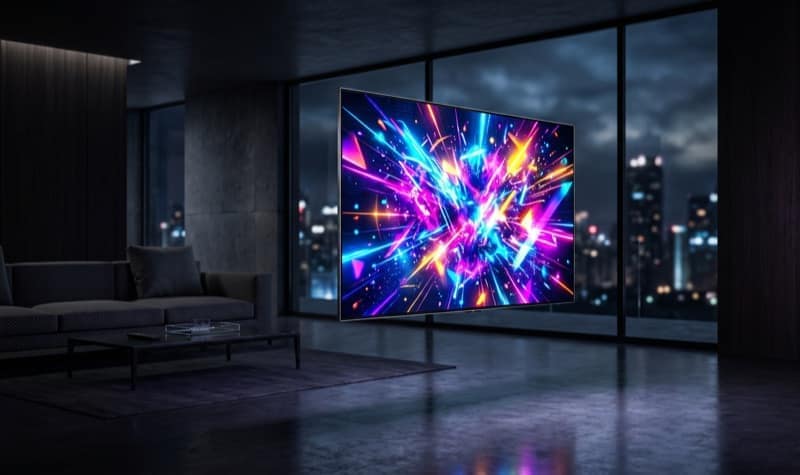
High Dynamic Range (HDR) is where QD-OLED truly flexes its muscles. With its ability to produce deep, inky blacks right next to blindingly bright highlights (often reaching 1000 nits or more in small windows), the contrast is staggering. But it's not just about peak brightness; it's about color luminance. Traditional OLEDs can lose color saturation in the brightest parts of the image. QD-OLED maintains its wide color gamut even at peak luminance, resulting in explosions that look hotter, skies that look deeper, and neon lights that practically jump off the screen.

The 4K 360Hz Equation: A New Standard for Speed and Clarity
For years, 4K resolution (3840 x 2160) was synonymous with 60Hz or, more recently, 120Hz and 144Hz. It was the "cinematic" resolution. Meanwhile, 360Hz was reserved for 1080p or 1440p displays, targeting the hardcore esports crowd who prioritized frame rates above all else.
Merging these two worlds—the immense pixel density of 4K with the buttery smoothness of 360Hz—creates an experience that is difficult to articulate until you've seen it firsthand.
The Impact on Competitive Gaming
In competitive games like Counter-Strike 2, Valorant, and Overwatch 2, milliseconds matter. A 360Hz refresh rate means the screen updates every 2.77 milliseconds. This dramatic reduction in frame time translates to incredibly smooth motion tracking, reduced input lag, and a distinct advantage when flicking to targets.
But why 4K for esports? Traditionally, 1080p was preferred to ensure GPUs could push 300+ frames per second. However, modern GPUs (like the RTX 4090 and the upcoming 50-series) are more than capable of driving esports titles at 4K resolution. The added pixel density provides a crucial benefit: visual clarity. At 4K, distant player models are rendered with significantly more detail. An enemy peaking from a long distance is no longer a blurry smudge of pixels; it's a sharply defined silhouette, making them easier to spot and track.
The Impact on Single-Player Epics
While the 360Hz speed is an esports dream, the 4K resolution combined with QD-OLED's HDR capabilities elevates single-player games to new heights. Exploring the dense, neon-lit streets of Cyberpunk 2077 or the breathtaking landscapes of Horizon Forbidden West on a 4K QD-OLED is a transformative experience.
The high refresh rate isn't wasted here, either. Even if you can't hit 360 FPS in these demanding titles, modern variable refresh rate (VRR) technologies like NVIDIA G-Sync and AMD FreeSync Premium Pro ensure that the display synchronizes perfectly with your GPU. Whether you're hovering around 80 FPS or 150 FPS, the motion remains tear-free and incredibly fluid. The overhead of a 360Hz panel means you have virtually unlimited headroom as GPUs continue to evolve.
Driving the Beast: The Hardware Requirements
Let's address the elephant in the room: driving a 4K display at 360Hz is an incredibly demanding task. You are asking your system to render over 8.2 million pixels 360 times every single second. That is a staggering 2.9 billion pixels per second.
To truly unlock the potential of these monitors, you need serious hardware.
The Graphics Card (GPU)
The GPU is the heart of your system, and for 4K 360Hz, only the absolute top-tier will suffice.
- The NVIDIA Route: The GeForce RTX 4090 is currently the only card that can consistently push high frame rates at 4K in a wide variety of titles without heavily relying on upscaling. However, even the 4090 will struggle to hit 360 FPS in demanding AAA games natively.
- The Power of Upscaling and Frame Generation: This is where technologies like NVIDIA's DLSS 3 (Deep Learning Super Sampling) and AMD's FSR 3 (FidelityFX Super Resolution) become essential. By rendering the game at a lower internal resolution and using AI to upscale it to 4K, these tools can dramatically increase frame rates with minimal loss in visual quality. Furthermore, Frame Generation inserts AI-generated frames between traditionally rendered ones, effectively doubling the frame rate and making that 360Hz target achievable in heavy single-player games.
The CPU and Memory
At 360Hz, CPU bottlenecks become a real concern, even at 4K. If your GPU is fast enough to render 300+ frames, your CPU must be fast enough to prepare those frames. Processors like the AMD Ryzen 7 7800X3D, with its massive L3 cache, are ideal for pushing high frame rates. Pairing a high-end CPU with fast DDR5 memory ensures that your system doesn't stall when trying to feed the GPU.
Connectivity: DisplayPort 2.1 and HDMI 2.1
Bandwidth is a critical factor for 4K 360Hz.
- HDMI 2.1 offers 48 Gbps of bandwidth, which is sufficient for 4K at 144Hz or 240Hz with Display Stream Compression (DSC). However, for 4K 360Hz, it requires heavy reliance on DSC, a visually lossless compression standard.
- DisplayPort 2.1 (specifically the UHBR20 standard) offers up to 80 Gbps of bandwidth. While not all current GPUs support the highest DP 2.1 standards, monitors equipped with DP 2.1 are future-proofed, ready to accept uncompressed (or lightly compressed) 4K 360Hz signals from the next generation of graphics cards.

Burn-in Concerns: Is It Still a Problem?
One cannot discuss OLED technology without addressing the specter of burn-in—the permanent retention of static UI elements on the screen. It is a valid concern, especially for PC monitors where taskbars, desktop icons, and static game HUDs are prevalent.
However, the industry has made massive strides in mitigating this issue. QD-OLED panels are inherently more resistant to burn-in than early OLEDs, and modern monitors come equipped with a suite of protective features:
- Pixel Shifting: The monitor subtly shifts the entire image by a few pixels at regular intervals, preventing any single pixel from displaying the same color constantly.
- Logo Dimming: The display detects static elements (like a channel logo or a game HUD) and automatically dims them to reduce stress on those specific pixels.
- Pixel Refresh/Panel Care: These are built-in maintenance routines that run when the monitor is in standby mode. They analyze and adjust the voltage sent to individual pixels, ensuring uniform brightness and color over the lifespan of the display.
Most major manufacturers now offer robust 3-year warranties that specifically cover OLED burn-in, providing peace of mind for early adopters. While it's still wise to take basic precautions—like hiding your taskbar or setting a screensaver—burn-in is no longer the dealbreaker it once was.
The Verdict: Are We There Yet?
The 4K 360Hz QD-OLED era is not just about raw numbers; it's about the emotional response these displays evoke. It's the feeling of seeing a game you've played for years and noticing details you never knew existed. It's the visceral thrill of tracking an opponent with zero motion blur. It's the realization that you no longer have to choose between speed and beauty.
These monitors represent a significant investment, both in the display itself and the hardware required to drive it. They are enthusiast products aimed at those who demand the absolute best. But for those willing to take the plunge, the experience is nothing short of breathtaking.
We are finally at the point where display technology has caught up to our wildest expectations. The no-compromise monitor is here, and it is a 4K 360Hz QD-OLED. The future of visual fidelity has arrived, and it looks spectacular.
Swayam tests AI tools, gadgets, and developer platforms hands-on before writing about them. His work focuses on making complex tech approachable — without the hype. He has covered over 75 products across AI, gadgets, and software for TechPixelly.